Your home screen
What everything on the home screen does, and the five tabs at the bottom.
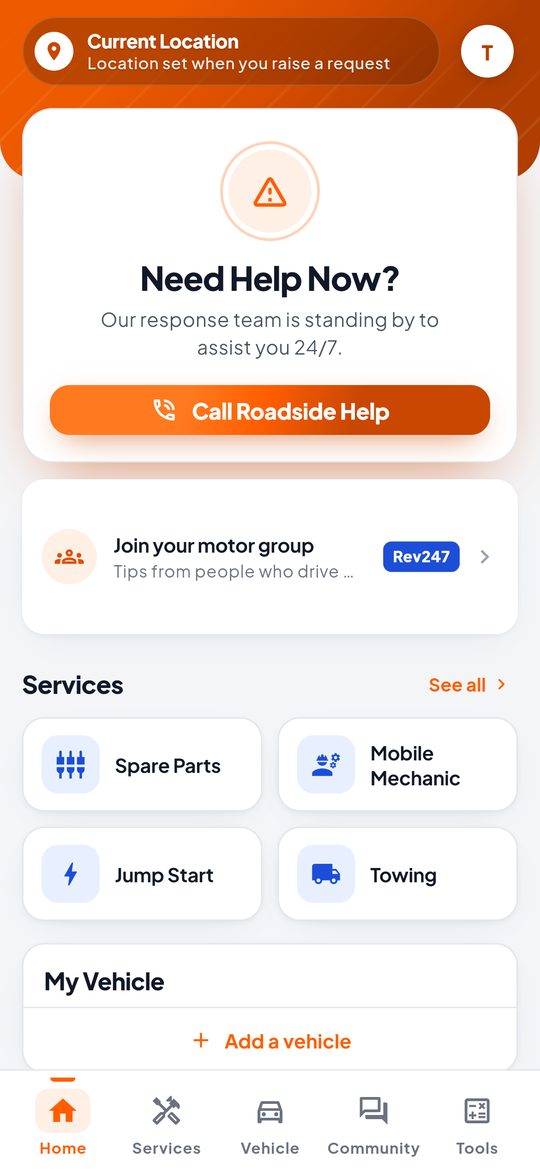
- Need Help Now? Tap Call Roadside Help to ask for towing, a jump start, a puncture repair and more.
- Join your motor group. Tips and news from people who drive the same make as you.
- Services. Shortcuts to popular services. Tap See all for the full list.
- My Vehicle. Your main vehicle. Add one so providers know what they are coming out to.
The tabs at the bottom
| Tab | What it is for |
|---|---|
| Home | Roadside help and shortcuts. |
| Services | Every service, with a search box. |
| Vehicle | Your vehicles. |
| Community | Groups for your car, with tips and offers. |
| Tools | Duty calculators for importing a vehicle and changing ownership. |
The round button at the top right opens My Profile and Settings.